Archiving & documenting family history – a guide for practical application
My standards are simple and pragmatic solutions. Can be used as a workshop
Table of contents / table des matières / indice / índice / Inhaltsverzeichnis
- Why Archiving principals & standards in general? => Consistency across archive levels
- Surname at birth is the master key of all items related to persons
- The surname at birth is ever leading part at naming personal items
- The source of archived items should be included as the ending part of the membername, or must be stored in member-remarks
- Strukturing of the family archive as repository with directories and subdirectories
- Archive equipment of paper archive
- Archive security and environmental conditions
- Overview of multiple archives relating to a common surname
Positioning and Limitations
This page, which is intended for archiving family research findings, is far away from professional archiving methods, such as those used in national or regional libraries by certified archivists. Here are very simple and pragmatic solutions, developed for > 2,000 identified individuals from Tabarelli families Germany and Weinheimer families Ockenheim, Rheinhessen.
Diese Seite zur Archivierung von Familienforschungsergebnissen ist weit entfernt von professionellen Archivierungsmethoden, etwa in Staats- oder Landesbibliotheken durch zertifizierte Archivprofis. Hier sind einfache und pragmatische Lösungen, entwickelt für > 2.000 identifizierte Personen der Tabarelli-Familien in Deutschland und Weinheimer-Familien in Ockenheim / Rheinhessen.
1. Why Archiving principals & standards in general?
Why Archiving principals & standards are needed in general?
The reason why / benefits:
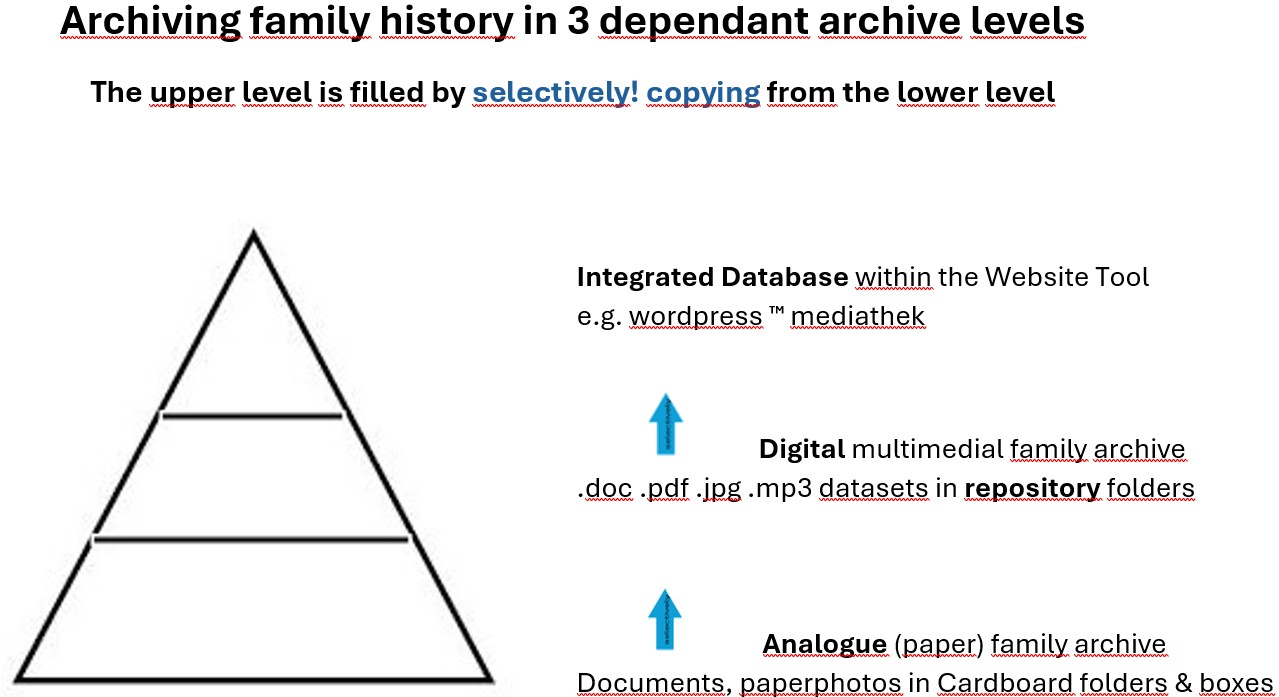
To keep the consistency across all 3 levels of family archives: PaperArchive => Digital Archive (Repository) => Presentation Database (website tool), see following information pyramide.
2. Surname at birth is the master key
The surname at birth is ever the permanent master key of all person related archiving members over the whole life cycle of the person at archiving analog (physically) or digital.
If a person is married and gets (mostly in Germany) another familyname (married familyname), and is divorced and married again (married familyname Nr.2) and his/her documents would be named by these different familynames they would be scattered / spread out by names in the archive folders / directories.
To keep all documents of a person over his/her lifecycle by one single expression, the surname at birth, would keep all informations together concentrated and sorted in the archive folders / directories.
- e. g. Birth document of Marilyn Monroe =>membername Monroe,Marilyn_birth_document.pdf
- e.g. Wedding document of her => membername Monroe,Marilyn_married_Kennedy.pdf
- e.g. Divorce document => membername Monroe,Marylin_married_Kennedy_divorce_document.pdf
- e.g. Second Wedding => membername Monroe,Marylin_Married(2)_Johnson_marriadge_document.pdf
The reason why / benefits:
All documents over the whole lifecycle of a person are not distributed and are ordered in the archive folders unique and can be easier found again later.
3. The surname at birth is ever leading part at naming of all personal items in the digital family archive
The surname at birth is ever leading part of the membername of all personal items in the digital family archive. The same rule is good for the naming of subdirectories of family-„line“ folders or person-related folders within the family archive.
The reasons why / benefits:
1. good ordering a big amount of items
2. Quick finding in a big amount of items
Membername Examples
- Tabarelli,Guiseppe_abc_def_…
- Tabarelli,Innominato_born_08.04.1810_Sant_Egidio_ Osp_mother_Teresa_Insomo_…
- Tabarelli,Heinrich_died_02.08.1891_…
Directoryname Examples
- Eisenhower-Ike-family (named directory)
- ….. Eisenhower,Dwight,David (first named subdirectory, filled with members of him)
- ….. Eisenhower,John (second named subdirectory, filled with members of John)
- ….. Eisenhower,Anne (third named subdirectory, filled with members of her)
4. The source of archived items can be included as the ending part of the membername
or can be stored in the remark field of the member.
The reasons why / benefits:
1. Needed for registering the copyright or the photographer name or similiar restricted informations of copyright law or author’s rights
2. Needed for publishing the item in your website presentation as footnote to an image or document description for copyright law or author’s rights
3. Source-related searching in a big amount of items
Membername in general:
Tabarelli,Guiseppe_abc_def_S_sourcename
_S_sourcename as …_S_www.abc.com / or …_S_libraryname like wikipedia / or …_S_anything-else-source-of-item
Membername Examples
Tabarelli,Guiseppe_birth_church_picture_S_www.tabarelli.org
Tabarelli,Heinrich_death_02.08.1891_S_churchbook_Tre_1867-1944_page_036_deathregister_1891_Nr.IX_f313
Tabarelli,Innominato_born_08.04.1810_Sant_Egidio_ Osp_mother_Teresa_Insomo_S1_familySearch_S2_churchbook_Trento_1548-1937
5. Strukturing of the family archive as repository with directories and subdirectories
The blue way or the red way? The key question before establishing an family archive is: Archiving only the end results (final objects) of the family researching process?
Or storing in the archive additionally all relevant informations of the pre-phases of the process before archiving like searching, finding, evaluating, retaining or discarding, developping own information-over-original-data (to make meta-documents like findbooks or overview listings) … and to maintain informations of the process phases after archiving like your presentation tools and your history steps / release documentation of publishing analogue in books or digital in your website?
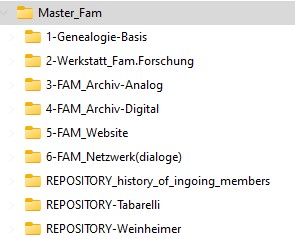
To keep these informations additionally to the Repository I defined 6 additional surrouding folders (1) to (6).
I had decided for my family archive to go the way storing elements of all process phases to get over the years a 6-folder-surrounded REPOSITORY as single point of information.
a) Single or dual Repository Concept
The digital archive contains all digital text, photographic and audio records, together with descriptions and overviews (metadata) developed by the publisher, organised thematically from A to Z in the large – REPOSITORY A-Z – such as REPOSITORY-Tabarelli.
To enable searches based on the dates items were added to the archive, all new additions can be organised quarterly or yearly and stored as a copy – duplicated in a further container – REPOSITORY_history_of_ingoing_members.
Both types of repository also serve as mutual backups in the event of accidental or hasty deletions of members.
b) Archive Organisation (how?) & Media (which tools?) – not the content
In addition to the repository, there is a further digital folder which documents the organisation, the software tools used, the archiving hardware used (laptops, SSD discs) and the backup procedures (multiple generations, stored on separate data carriers, in different locations), in other words, the overall ‘HOW?’ and ‘WITH WHAT?’ of the digital archive, in folder (4)-FAM_ARCHIV-DIGITAL, but no archive elements (no content).
The organisation of the analogue (paper) archive and the equipment used (archive boxes, archive cartons, folders, files, shelving, as well as climate control, access control, etc.) – in other words, once again the ‘HOW?’ and ‘WITH WHAT?’ of the analogue archive – are also documented in folder (3)-FAM_ARCHIV-ANALOG, but no archive elements (no content).
c) Archive Workbench and genealogical Basics
Ultimately, archiving is merely the final stage of a wider process known as ‘family RESEARCH’, which is preceded by other steps: searching, finding, evaluating, retaining or discarding, supplementing, organising, assigning meaningful and systematic names (to make retrieval easier), and assigning items to families and individuals (preparing items for archiving). For all of this, there is a digital workspace serving as a folder (2)—workbench_Fam.Forschung.
For family research, archiving and online presentation, there is specialist literature, handbooks, basic knowledge, basic rules, principles, genealogy societies, institutions and networks, journals, and organisational information, all of which is organised in the folder (1) – Genealogy Basics.
d) Transformation from the storage room (archive) to your shop-window (website)
To facilitate the transition from the digital archive (the ‘organised storage room’) to the presentation of selected items on the family history website (the ‘shop window display’), selected items are converted (resizing photo formats using DEEPL.com, converting text formats from docx to pdf, etc.) are recorded in folder (5) – FAM_Website – before they are uploaded to the WORDPRESS-MEDIATHEK TM database of the WORDPRESS TM presentation software. (Upload)
e) family research meta data and websit traffix analysis
The folder (5) – FAM_Website – also contains final (published) versions of the overviews of archival records developed by the editor in text, table and image formats (the metadata = data about data), which can also be uploaded to the website via the WORDPRESS-MEDIATHEK TM.
Also included are visitor statistics for the website (website traffic) as a basis for analysing which individual pages of the website have been visited (traffic analysis).
f) Networking and dialog results with othe family researchers
A password-protected container for contact details (addresses) and key correspondence (letters, digital attachments, email logs) with other family researchers is the folder (6)-FAM_Network (correspondence).
g) Example maindirectory (directory level 1) with 2 family repositories
These verbally described components of the digital family archive of the Johann Tabarelli line form the following main structure (head structure)
h) Substructuring by family line folders
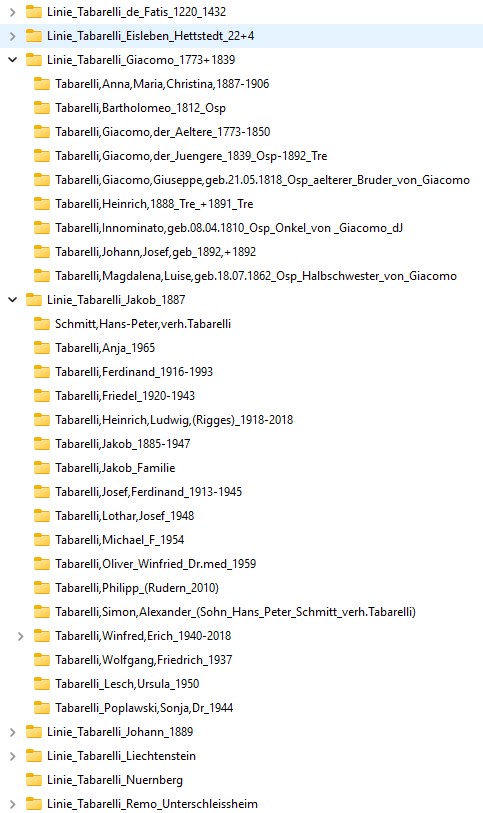
The family research can get a big amount of data of many persons of your family over the centuries. It is helpful not order all persons alphabetic by surname-at-birth-folders in one sequence A-Z. It is helpful to cut your family data by separated family-line-folders. In the following example the data is divided by 6 family line folders like „Linie_Tabarelli_xxx“, two of them are expanded by their containing person-folders. Click to enlarge.
Example subdirectories (directory levels 2+3) with 6 family line folders
i) including linked by marriage families
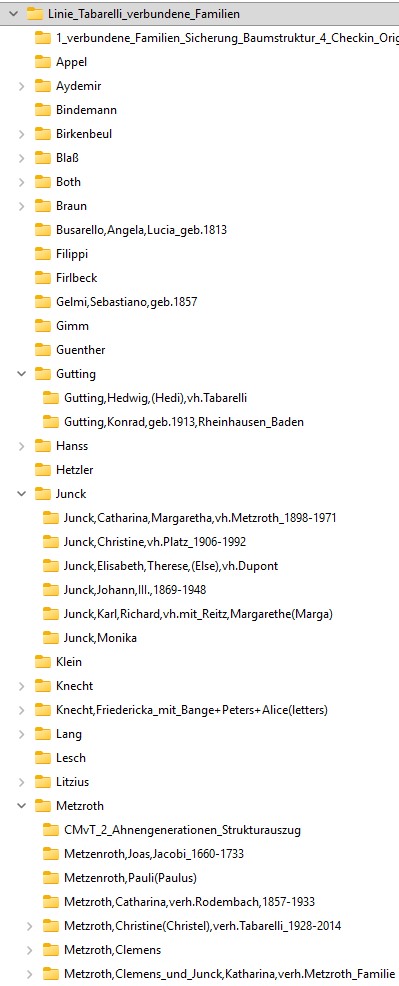
When family history research is extended to include families linked by marriage (which greatly enhances the value and enjoyment of the hobby), then it is easy to headle them like above as special family line folder exploded by the connected familynames A-Z, within these connected familynames explode by person-folders.
In the following example the data is divided by many family folders A-Z, two of them „Gutting and Junck“ are expanded by their containing person-folders. Click to enlarge.
Example subdirectories (directory levels 2+3+4) with many family folders
j) Content & Structural Levels 1 and 2 of the digital Archive
It is not possible to describe all structuring details as above. The next link shows the entire structure of the digital family archive for the Johann-Tabarelli-line, including all nine subdirectories (as at 19 September 2024).
display >>> Content & Structural Levels 1 and 2: Digital Archive .pdf
If you have questions about my structuring of the digital family archive please mail to ==> tabarelli.family (at) freenet.de
6. Archive equipment of paper archive
Nowadays, many documents are processed digitally and, at the same time, archived in archive boxes made of special cardboard, paperboard or paper. Whilst, for example, in an office environment many documents must be archived in accordance with legal requirements (and, conversely, disposed of once the retention period has expired), in archive institutions, museums, libraries and in private or public collections, the relevant archival records are often kept for much longer – usually for many decades, and ideally even for many centuries.
The proper, organised and, above all, secure storage of paper-based documents requires specialised archival packaging that not only saves space but also protects the archival material in the long term as safeguard cultural heritage. Photographs, written documents, maps and many other items can thus be preserved in the best possible way for future generations.
Archive boxes and cartons have proven their worth as high-quality packaging solutions for protecting cultural artefacts, administrative records and document collections of all kinds. A wide range of acid-free, archive-safe archive boxes and cartons for conservation packaging – which protect against harmful influences, compensate for climatic fluctuations and thus significantly slow down the ageing process of the contents – are standardised in terms of format and construction and made from solid board: slip-lid boxes, hinged-lid boxes, stand-up boxes, front-flap boxes and index card boxes, which are available in many formats such as DIN A4, folio, DIN A3 or newspaper format.
Source of text: Copyright © Hans Schröder GmbH TM – www.archivbox.com TM – Archiving Support Company, Germany
7. Archive security & environmental conditions
Room temperature and humidity (in german) 
Copyright © Hans Schröder GmbH TM – www.archivbox.com TM – Archiving Support Company, Germany
read >>> Archive room (of paper archive) security & environmental conditions
8. Overview of multiple archives relating to a common surname
When different genealogists are researching a shared surname, gathering information and presenting their findings – in my case five different Tabarelli family researchers – it is helpful to document an organisational structure that brings together many analogue and digital sources of the same familyname.
This can facilitate the exchange of information among them. Here is an example:
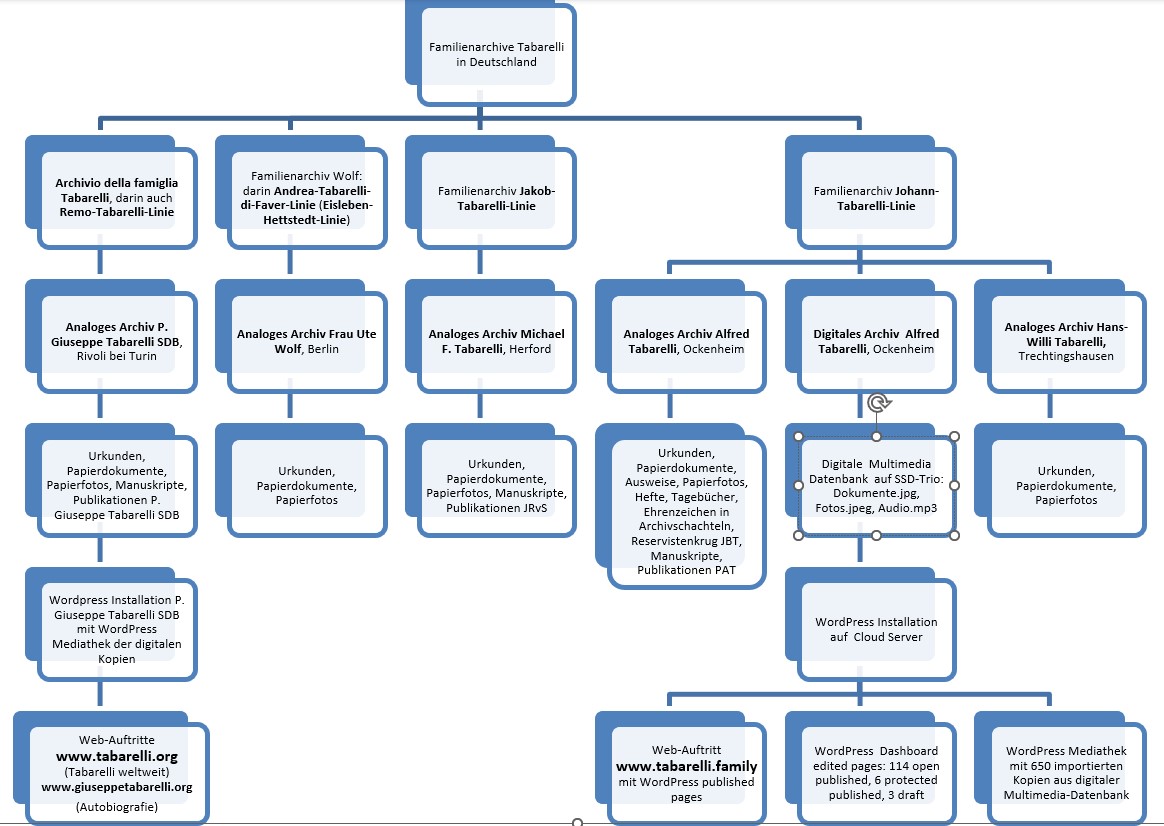
Grafik: © Alfred A. Tabarelli 2023. click to enlarge
Key to abbreviations
JBT Johann Baptist Tabarelli, JRvS Johanna Rodenbach verheiratet Spangenberg, PAT Petra Alexa Tabarelli, SDB Salesianer Don Boscos, SSD Solid State Disc (Halbleiter basierte Festplatte).
- Fine „Archiving principals & standards“ Last-update 03.10.2026